Customize the PR page
SourceLab offers the possibility to customize the page that creates pull-request to add your specific information, such as: please follow the XYZ coding style, run the tests or whatever you wish to inform contributors when they open a new pull-request.
The customization is done via a file in the git repository containing the meta-data for the pull-requests. This file must be placed under a templates folder, be named contributing.md and can be formatted as you wish using markdown.
Example
For a project named test on pagure.io.
- First, clone the pull-request git repo1 and move into it
- Create the templates folder
- Create the customized PR info
And place in this file the following content:
Contributing to test
====================

When creating a pull-request against test, there are couple of items to do
that will speed up the review process:

* Ensure the unit-tests are all passing (cf the ``runtests.py`` script at the
  top level of the sources)
* Check if your changes are [pep8](https://www.python.org/dev/peps/pep-0008/)
  compliant for this you can install ``python-pep8`` and run the ``pep8`` CLI
  tool
- Commit and push the changes to the git repo
- And this is how it will look like
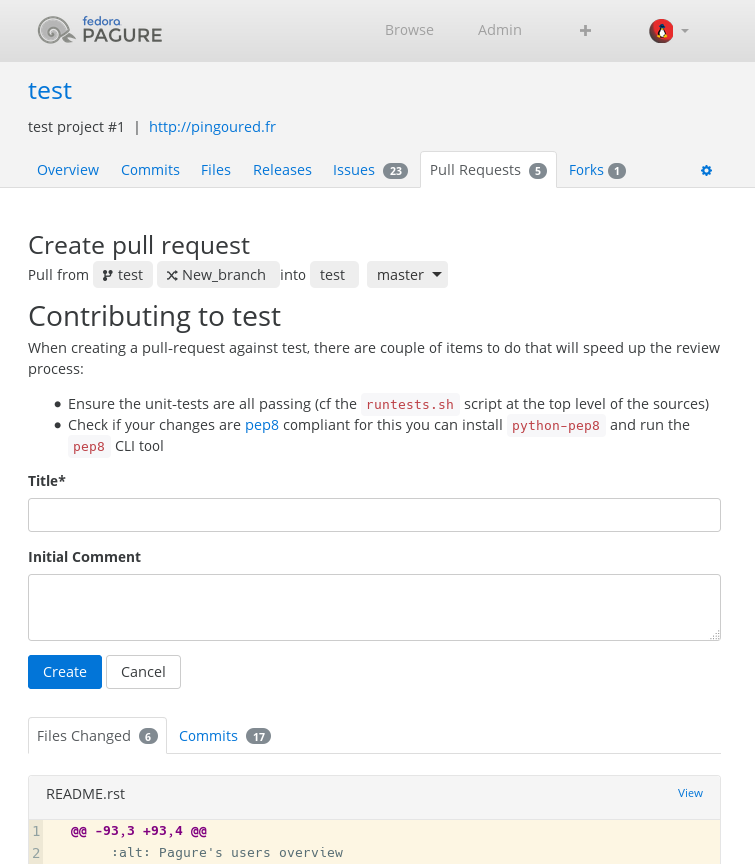
-
All the URLs to the different git repositories can be found on the main page of the project, on the right-side menu, under the section
Source GIT URLs, click onmoreto see them. ↩